
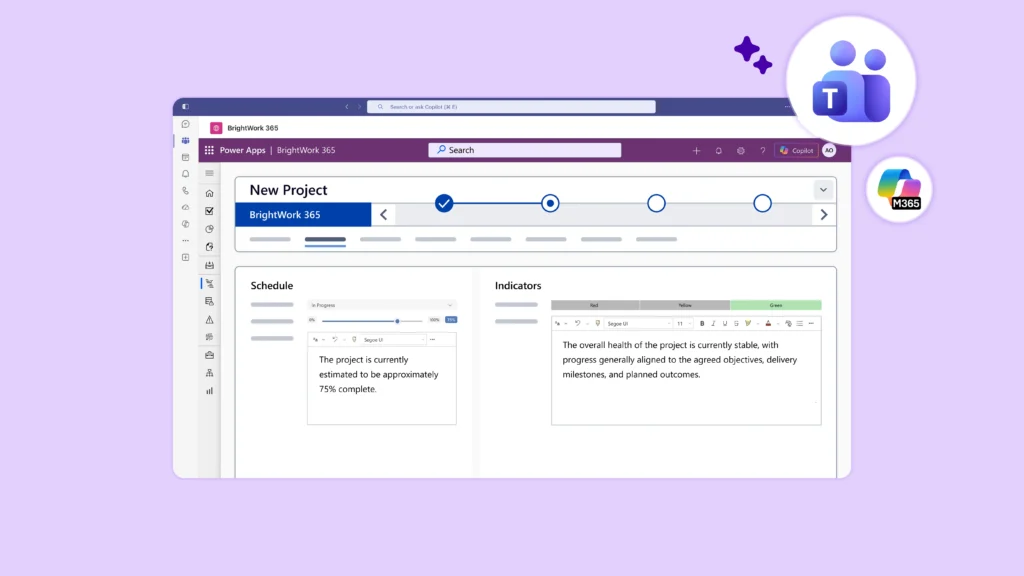
A team board shows what people are doing today. A PMO requires a clear view of how project work moves across the entire business. Small groups often get by with a simple timeline or shared task list. But PMO leaders need structured project requests, reliable templates, risk tracking, and a delivery view executives can trust.
For Microsoft 365 teams, the software choice narrows quickly. Should project work stay close to Microsoft Teams, SharePoint, Power BI, and existing permissions, or should the PMO move everything into a separate, standalone platform?
The answer depends on your operating model. Microsoft 365 alone handles light coordination well. Standalone tools suit teams using mixed software stacks who want an isolated work platform. A Microsoft 365-based PMO layer like BrightWork 365 fits organizations that want project and portfolio structure directly inside the Microsoft environment their teams already know.
Article Highlights:
-
PMO software for Microsoft 365 teams should support intake, templates, reporting, governance, and portfolio visibility.
-
Microsoft 365 provides PMOs with a strong collaboration base, but it does not offer a ready-made PMO operating model out of the box.
-
Using Microsoft 365 alone becomes difficult when groups build separate processes across Planner, Lists, Excel, SharePoint sites, and PowerPoint reports.
-
Adding a PMO layer helps standardize project work while keeping collaboration tied to Teams, SharePoint, Power BI, and existing permissions.
-
BrightWork 365 supports Microsoft-first PMOs that need more structure without moving core project work into a disconnected platform.
Why PMO Software Decisions Differ From Team Tools
Team project tools usually win based on ease of use. Users just want to assign tasks, check deadlines, and update status without hunting through five different screens.
PMO software handles a broader job. It helps organizations manage project work as a complete system. That usually means capturing requests, supplying standard templates, tracking risks, and feeding executive portfolio dashboards.
PMO leaders are accountable for consistency, not just daily activity. They must know which projects remain active, where work stalls, which items demand attention, and which incoming requests deserve approval.
A task board shows what a team is doing. Proper PMO software reveals how the full portfolio performs.
What Microsoft 365 Already Gives PMO Teams
Microsoft 365 provides PMO teams with a solid base for collaboration and work management.
Teams rely on these apps for meetings, conversations, documents, and task tracking. SharePoint handles document management and structured lists. Planner covers lightweight task coordination, while Power Automate runs workflows. Finally, Power BI helps users build detailed dashboards and reports.
This mix becomes easier to understand when teams compare Microsoft and Office 365 project management apps based on the specific job each tool performs.
That baseline holds real value for organizations already committed to the ecosystem. Employees work inside tools they recognize. IT teams keep identity, access, and collaboration safely inside the Microsoft boundary.
The practical challenge remains simple: Microsoft 365 operates as a platform, not a ready-made PMO system. The individual pieces work well, but someone still has to assemble them into a repeatable process.
Where Microsoft 365 Alone Gets Harder
Relying solely on Microsoft 365 becomes difficult when every department builds a custom version of project management.
One team might use Planner, while another relies on Lists or Excel. A different group could build a SharePoint site with custom fields or present status updates in PowerPoint. Each method works locally. However, the PMO ends up with scattered data, inconsistent templates, and reporting that relies heavily on manual updates.
Four pressure points usually appear first:
Project Intake
PMOs need a predictable path for business justification, sponsor details, resource estimates, and approvals. Forms, Lists, SharePoint, and Power Automate handle intake well enough. Even so, the PMO must design and maintain the actual project request management process.
PMO Standards
Teams require shared templates, uniform status definitions, risk ratings, and strict approval gates. Microsoft provides tools to document those standards, yet it cannot force every project to follow the same model. Using clear project planning templates reduces this procedural drift.
Portfolio Reporting
Executives expect a clear view across project health, schedules, risks, issues, and resource allocation. If data sits scattered across different plans, lists, files, and sites, portfolio reporting turns into a frustrating, manual collection exercise.
Adoption Load
These tools feel familiar, but project teams still need to know exactly where work lives. They must understand which template to choose, how approvals function, and what leaders expect to see during reviews.
A Microsoft 365-based PMO layer steps in to reduce this administrative burden.
Microsoft 365-Based PMO Layer vs Standalone Platform
The choice goes beyond comparing Microsoft against standalone tools. PMO leaders must compare underlying operating models, rather than just scrolling through feature lists.
Relying on native Microsoft apps works when project coordination remains light and the PMO has the internal time to build workflows. Adding a PMO layer fits teams that require strict governance, clear reporting, and standardized delivery directly inside their current environment. Conversely, a standalone platform makes sense for organizations aiming to consolidate mixed tools into one entirely separate work system.
What PMO Leaders Should Compare
The correct model depends on where project data belongs, the level of governance required, executive reporting expectations, and the team’s capacity for change. Evaluating these four areas typically reveals which path makes the most sense.
Data Location
Project work spans documents, chat threads, tasks, reports, approvals, and user permissions. An integrated PMO layer keeps this information close to the environment where teams naturally collaborate. This matters heavily for groups already using SharePoint project management tools to organize their document libraries and project sites.
Governance Model
Native Microsoft apps offer teams incredible freedom, but that flexibility often breeds inconsistent habits. A packaged PMO layer introduces controlled templates, strict workflows, request management, and portfolio oversight without leaving the Microsoft ecosystem.
Reporting Path
Reliable reporting requires clean, consistent data. Solutions like BrightWork 365 use Power BI and Power Apps dashboards to deliver project, program, and portfolio visibility. This integration proves highly valuable when executives already depend on Power BI project management dashboards to track performance.
Adoption Path
Standalone tools often demand significant behavior changes. Users must learn a completely new system just to update their project tasks. Staying within the Microsoft footprint reduces that adoption friction for employees already comfortable in Teams, SharePoint, and Outlook. In these environments, Microsoft Teams apps for project management naturally blend into daily routines.
Where BrightWork 365 Fits
BrightWork 365 bridges the gap between basic Microsoft 365 apps and a completely separate project management platform.
It acts as a project and portfolio management solution deployed directly inside the customer’s existing tenant. The software relies heavily on the Power Platform, utilizing Power Apps, Power Automate, Power BI, Dataverse, Teams, and SharePoint Online.
Both deployment and reporting capabilities tie directly to the customer’s current licensing setup for those Microsoft products.
For PMO leaders, the software serves a specific purpose:
-
Providing more structural control than native Microsoft apps offer.
-
Maintaining closer alignment with Microsoft than any separate third-party platform can achieve.
-
Delivering a packaged starting point for requests, templates, workflows, and reporting.
-
Offering guided rollout support for teams navigating a phased maturity path.
That distinction remains important. BrightWork 365 is not just “using Microsoft 365.” It is also not a generic, disconnected tool. It functions as a dedicated PMO and PPM platform for teams seeking strict project structure inside the environment they already use every day.
When Standalone Tools Make Sense
Standalone project platforms make sense when an organization explicitly wants a distinct, separate operating system for work. This happens often when coordinating across highly varied departments, mixed collaboration styles, and diverse software stacks.
Tools like Smartsheet, monday.com, Asana, Wrike, ClickUp, and ProjectManager all prove useful in different scenarios. They vary heavily in PMO depth, resource planning capabilities, reporting power, and Microsoft integration. Buyers should evaluate them based on the target operating model, rather than treating them as interchangeable names.
For a Microsoft-first PMO, the question isn’t whether standalone tools are good. Most of them are excellent. The real question is simply: “Do we want our PMO operating model to live in an external platform, or do we want to extend our existing Microsoft investment?”
Decision Framework for PMO Leaders
The best PMO software choice hinges on project complexity, organizational commitment to Microsoft, governance requirements, and the amount of change the staff can handle.
When Microsoft 365 Alone or Standalone Tools Fit
Stick to native Microsoft apps when project management stays light, teams already practice good habits, and the PMO holds little authority over central governance.
Choose a standalone platform if the business demands one isolated system to manage work across completely different departments and non-Microsoft software stacks.
When a Microsoft 365-Based PMO Layer Fits
Introduce a Microsoft-based PMO layer when the organization fully commits to the Microsoft ecosystem but desperately needs structure for intake, templates, workflows, portfolio reporting, and strict governance.
Consider BrightWork 365 when the PMO must manage incoming requests, enforce standardized templates, generate Power BI portfolio dashboards, and maintain Teams and SharePoint collaboration—all while leveraging existing user permissions and receiving guided rollout support.
BrightWork 365 rarely fits groups that only need basic task tracking or lack the desire to manage a Power Platform-based deployment.
PMOs dealing with highly advanced project portfolio management for Microsoft 365 must also carefully evaluate portfolio-level visibility, financial controls, reporting depth, and long-term governance support.
Common Questions About PMO Software for Microsoft 365
What Is PMO Software in Microsoft 365?
PMO software in this context helps teams manage project requests, templates, approvals, risks, and portfolio reporting. Crucially, it does this while keeping the actual work connected securely to native Microsoft apps and user permissions.
Can Microsoft 365 Work as PMO Software by Itself?
Yes, the native apps handle many basic PMO activities, especially in lighter environments or within teams possessing deep internal configuration skills. However, growing PMOs almost always require added structural layers to support repeatable intake, governance rules, and reliable portfolio reporting.
How Is BrightWork 365 Different From Standalone PM Tools?
BrightWork 365 operates entirely inside the Microsoft ecosystem. Standalone tools force teams to log into a separate platform to update their project tasks. BrightWork 365 simply layers PMO structure over the top of the Teams, SharePoint, and Power BI tools your staff already uses daily.
Choose the PMO Model Before the Software
Before buying PMO software, map out your desired operating model.
If the team only requires loose coordination, the native Microsoft suite often suffices. If the business specifically wants an isolated work platform, evaluate the standalone tools. But if the PMO needs strict governance, consistent templates, and deep portfolio reporting built directly inside Microsoft, BrightWork 365 belongs on the shortlist.
The smartest decisions start by looking at how people actually work, rather than comparing software features. For Microsoft-first PMOs, the evaluation must include checking how a proposed Microsoft 365 project management solution handles daily intake, governance, reporting, and actual team collaboration.
To see the platform in action, watch the BrightWork 365 demo.