
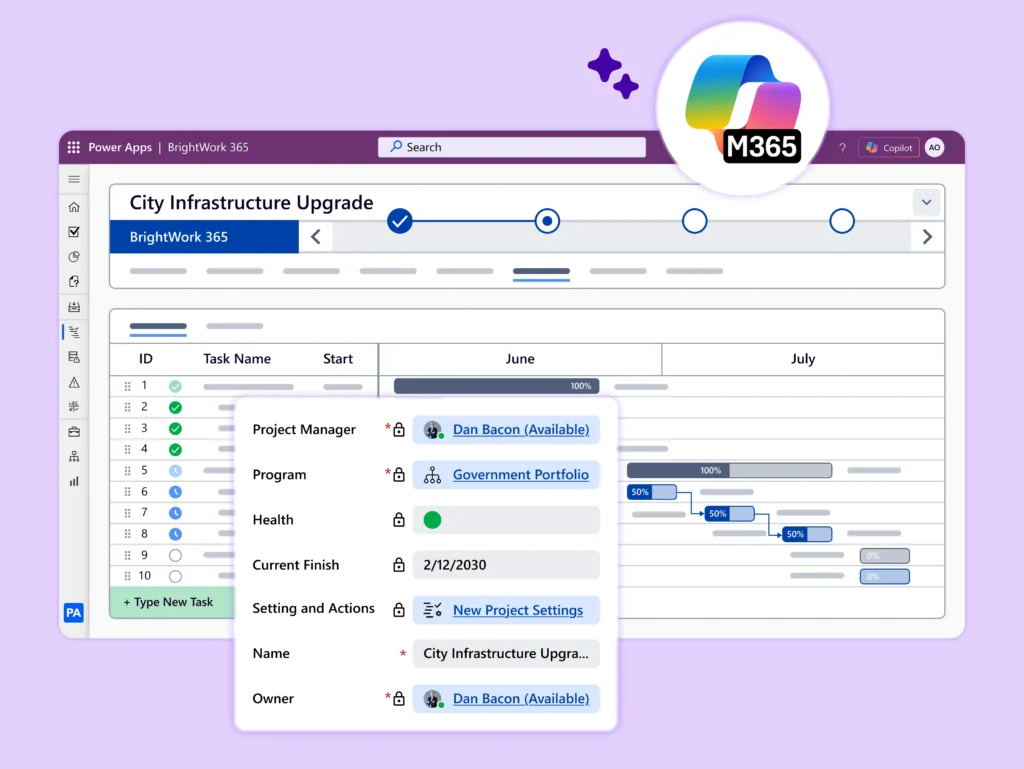
Managing Public Sector Projects in a New Era
Government project managers have always worked in one of the most demanding environments imaginable. You are accountable to Senior officials, auditors, the public, and your own teams, all at once. Every decision is subject to scrutiny. Every delay has consequences beyond the balance sheet.
Today, that pressure is intensifying. Digital transformation mandates, cross-departmental collaboration requirements, procurement reforms, and evolving citizen expectations are pushing government project teams to do more faster, and with greater transparency than ever before.
And yet many public sector organizations are still managing multi-million-dollar capital programs, IT modernization initiatives, and regulatory compliance projects with a patchwork of spreadsheets, email chains, and outdated tools that were never designed for this scale of complexity.
This guide is written specifically for project managers, project leads, senior responsible owners (SROs), and Program Management Office (PMO) leaders working in government. Whether you work in central government, local authorities, health agencies, or state bodies, you will find practical guidance on how Microsoft 365 and BrightWork 365 can help you plan, deliver, and report on projects with the rigor and transparency that public service demands.
Who This Guide Is For
-
Project Managers and Project Leads who are responsible for day-to-day delivery of government programs
-
Senior Responsible Owners (SROs) and Directors who need portfolio-level visibility without drowning in status emails
-
PMO Leaders who need to standardize governance, reporting, and lessons learned across departments
-
IT and Digital Transformation Leads evaluating project management tools within the Microsoft 365 ecosystem
Improve Government Project Delivery
Improve operations, visibility, and collaboration across projects with BrightWork 365 and Microsoft 365.
The Unique Challenge of Government Project Management
Before selecting any tool or methodology, it is worth acknowledging what makes public sector project management genuinely different from the private sector.
The Hidden Complexity of Cross-Departmental Delivery
Many government programs span multiple departments, agencies, or tiers of government. A national infrastructure program might involve a central government department, a regional authority, multiple contractors, and a range of regulatory stakeholders. Coordinating work, decisions, and dependencies across these boundaries while maintaining clear lines of accountability is a significant challenge that generic tools rarely address.
Procurement and Compliance Constraints
Public procurement rules govern how government bodies select and contract suppliers, including software vendors. This means project management tools must typically meet requirements around data sovereignty, security classification, accessibility standards, and supplier management. Microsoft 365 is already a trusted and widely approved platform across government, making Microsoft-native project management solutions a natural fit.
Government organizations must also respond to evolving legislation, policy updates, and regulatory requirements. Project management solutions should be adaptable enough to accommodate new processes, reporting requirements, and governance controls without requiring costly redevelopment or lengthy implementation projects.
The Pressure to Demonstrate Benefits Realization
Unlike commercial projects, government projects are ultimately judged not just on delivery but on outcomes did the policy objective get achieved? Did citizens benefit? Were savings delivered? Project managers in government must therefore track not just tasks and milestones, but benefits realization, KPIs, and strategic alignment throughout the project lifecycle.
Accountability and Governance by Design
In government, projects are not simply commercial endeavors. They are funded by taxpayers, scrutinized by oversight bodies such as the Government Accountability Office (GAO) / Inspector General, legislative oversight committees, and subject to the Government Major Projects Portfolio (GMPP) reporting framework or equivalent national standards.
Project managers are expected to maintain auditable project records, document decisions and change controls, and demonstrate value for money at every stage of the project lifecycle.
Task, Project, and Program Management — Getting the Language Right
Government project management uses a specific vocabulary. Understanding the distinction between task management, project management, and program management is not just semantic – it directly affects which tools and processes you need.
Task Management
Tasks are the individual actions that deliver a project output. In government terms, tasks might include drafting a policy paper, completing a risk assessment, obtaining leadership sign-off, or processing a planning application.
Task management tools help teams assign, track, and close individual actions without losing sight of who is responsible for what.
Project Management
A project in the government context is a time-limited initiative with a defined scope, budget, and set of outcomes. It might be the rollout of a new digital service, the construction of a public facility, or the implementation of a new piece of legislation.
Project management means coordinating all the tasks, resources, risks, issues, and dependencies that contribute to that outcome and reporting progress clearly to governance bodies.
Program Management
Programs are collections of related projects managed together to achieve a strategic objective. The Government Transformation Strategy, for example, is a program encompassing dozens of individual projects across multiple departments.
Program management requires visibility across all constituent projects, the ability to manage interdependencies, and the capacity to report at multiple levels of granularity from leadership briefings to detailed project health dashboards.
Portfolio Management
At the highest level, portfolio management gives senior leaders, agency executives, and C-Suite equivalents in state bodies, a consolidated view of all live projects and programs.
This visibility is essential for resource allocation decisions, risk escalation, and strategic reprioritization.
The PRINCE2 and MSP Connection
Government organizations often adopt established frameworks and certifications such as PMI’s Project Management Professional (PMP), Agile approaches promoted by Scrum Alliance, PRINCE2 (Projects IN Controlled Environments), or MSP (Managing Successful Programs).
BrightWork 365 supports these methodologies by enabling stage-gate reviews, exception reporting, highlight reports, and end-stage assessments to be built directly into project workflows on the Microsoft 365 platform.
Microsoft 365 Tools for Government Project Management
Microsoft 365 is already deployed across the majority of central and local government in the US and across Europe. Rather than introducing an entirely new technology ecosystem, government organizations can leverage the Microsoft 365 tools they already have and extend them with specialist project management capability.
Microsoft Planner: Task Management for Government Teams
Microsoft Planner provides a visual, board-based task management experience that is accessible to all team members, regardless of their technical background. For government teams, Planner is particularly well-suited to managing the operational tasks within a project — action logs, meeting follow-ups, executive queries, and correspondence tracking.
1. Action Logs and Issue Tracking
In government, every meeting generates actions. Planner allows project managers to organize actions by status (Open, In Progress, Awaiting Response, Closed) and assign them to named individuals with due dates. This replaces the manual spreadsheet action log that clogs inboxes across so many government offices.
2. Leadership and Stakeholder Correspondence
Planner can be configured to track correspondence items Legislative Questions, Freedom of Information requests, leadership briefing requests as tasks with associated deadlines, documents, and responsible owners. This gives project managers an always-current view of outstanding commitments without trawling through shared mailboxes.
3. Cross-Departmental Workstreams
Guest access in Microsoft 365 allows project team members from other departments or external agencies to be granted controlled access to relevant plans. This facilitates genuine collaboration across organizational boundaries without compromising security, as access can be restricted to specific plans and information.
4. Progress Reporting for Governance Boards
Planner’s built-in charts show task completion by status, bucket, and assignee. For project managers who need to prepare highlight reports or exception reports for governance boards, this provides a real-time snapshot of workstream progress that can be exported or screenshared directly in board meetings.
Limitations of Microsoft Planner
While Microsoft Planner is an effective tool for managing team-level tasks, it has limitations when applied to complex government projects, programs, and portfolios.
-
Planner does not provide the structured governance, milestone tracking, risk and issue management, or portfolio-level visibility required for managing large, multi-agency initiatives.
-
It lacks built-in support for standardized reporting, audit trails, and stage-gate controls that are often necessary to meet oversight and compliance requirements in government environments.
This gives significant reason to government agencies and leaders to consider how Planner fits within a broader project and portfolio management approach particularly where visibility, accountability, and regulatory alignment are critical.
SharePoint Online: Centralized Document Management
SharePoint Online is the foundation of effective document and information management in Microsoft 365. For government project managers, SharePoint provides a secure, auditable, and collaborative workspace that replaces the network drives and fragmented email chains that undermine so many project teams.
1. Secure Document Management with Version Control
Government projects generate enormous volumes of documentation — business cases, project initiation documents (PIDs), risk registers, stakeholder maps, technical specifications, contractor correspondence, and leadership submissions. SharePoint Online provides version control, access management, and a full audit trail for every document, ensuring that teams always work from the latest approved version.
2. Project Sites as the Single Source of Truth
BrightWork 365 Project and Portfolio management solution seamlessly integrates with SharePoint Online for centralized document management. This allows project teams to store and access project documents in one place. This eliminates the classic government problem of project information being scattered across multiple network locations, email accounts, and personal drives.
3. Audit-Ready Document Control and Governance
SharePoint Online enables controlled document management with version history, access permissions, and audit tracking. In BrightWork 365, this ensures that all project documentation is securely managed and aligned with governance requirements helping government teams maintain audit-ready records without additional administrative effort.
4. Accessibility and Security
Storing project documents in SharePoint Online brings the highest security standards of the Microsoft cloud infrastructure and can be configured to meet government security requirements, including data residency, multi-factor authentication, and information classification. It is accessible from any device, enabling hybrid and remote government teams to collaborate effectively.
Power BI: Reporting for Senior Leaders and Audit Bodies
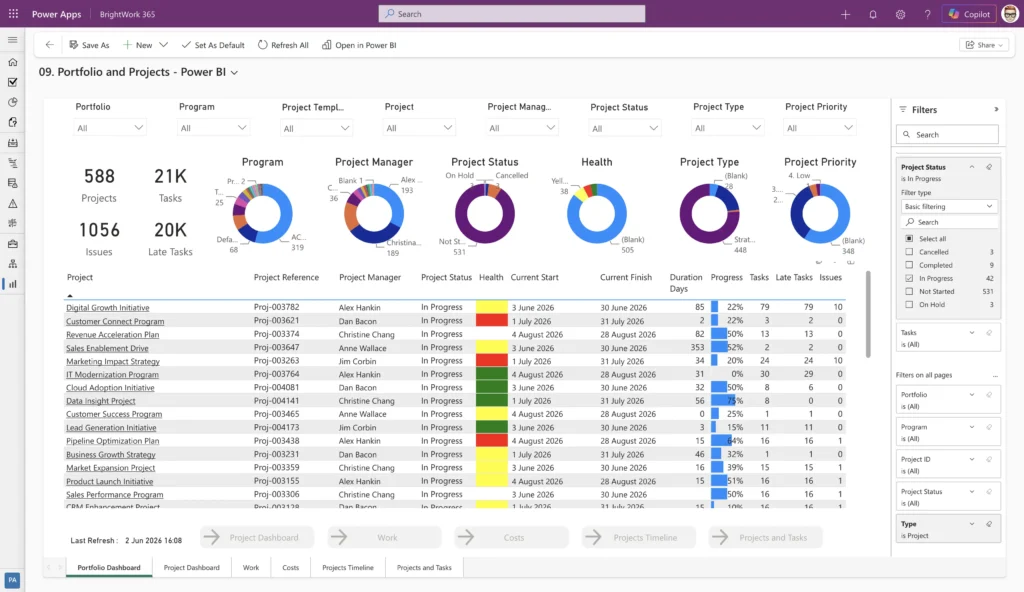
One of the most persistent frustrations in government project management is the time spent preparing status reports, portfolio dashboards, and financial summaries for senior leaders, governance boards, and external oversight bodies. Power BI transforms this process.
1. Real-Time Portfolio Dashboards
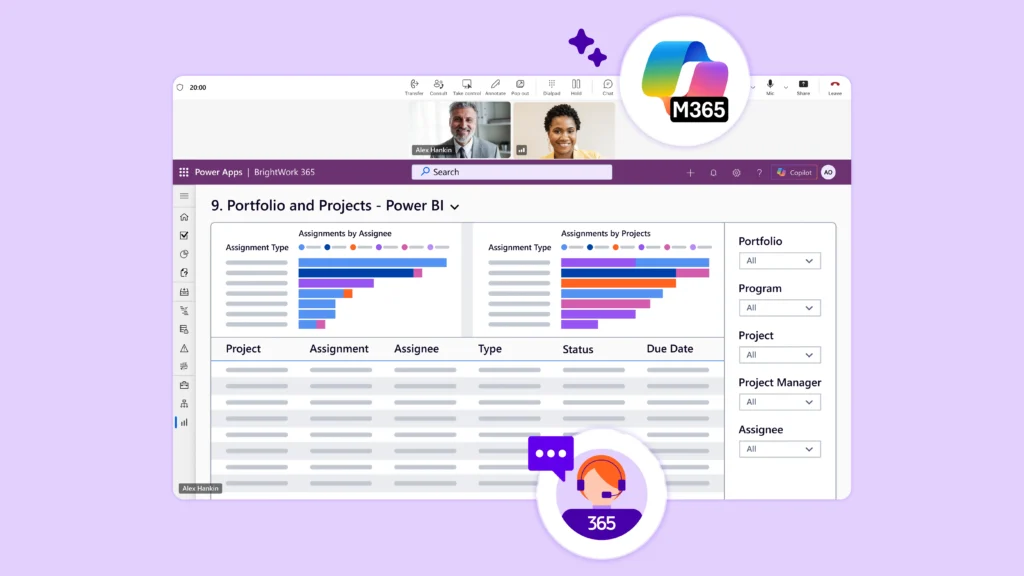
BrightWork 365 integrates directly with Power BI and Power Apps to provide senior leaders and executives with real-time dashboards showing the health and key project status of every project in the portfolio. Traffic-light RAG (Red, Amber, Green) status, milestone adherence, budget utilization, and risk exposure can all be presented in a single, visually clear interface that requires no manual data entry.
2. Audit-Ready Reporting
For government organizations that are subject to internal audit, value-for-money studies, or legislative oversight, Power BI enables the rapid production of evidence-based reports that draw directly from live project data. There is no longer a need to manually assemble figures from multiple spreadsheets on the eve of an audit visit.
3. Benefits Realisation Tracking
Power BI dashboards can be configured to track not just project delivery metrics, but benefits realisation KPIs — the outcomes that justify the original investment case. This is a particular requirement for government projects funded through the federal/state funding compliance requirements or equivalent national capital appraisal frameworks.
4. Custom Reports for Different Audiences
A leadership briefing requires different information at a different level of detail than a technical project board. Power BI allows project managers to create multiple report views from the same underlying data, tailoring the presentation for each audience without duplicating data entry.
Microsoft Teams: Collaboration Across Government
Microsoft Teams has become the standard collaboration platform across government. BrightWork 365 integrates natively with Teams, allowing project teams to access documents, chat, and schedule meetings directly within their Teams workspace.
For project managers running hybrid teams, cross-departmental working groups, or contractor relationships, Teams provides a secure and familiar environment for structured project communication. Meeting recordings, decisions, and action items can be captured directly within the project workspace, creating an auditable communication record.
Why Familiarity Matters for Adoption
One of the biggest challenges in government technology initiatives is user adoption. Because Microsoft 365 and Teams are already widely used across many state and local agencies, project teams can work within a familiar environment rather than learn an entirely new system. This reduces training requirements, accelerates implementation, and helps departments realize value more quickly while minimizing disruption to daily operations.
BrightWork 365 – Purpose-Built PPM for Government on Microsoft 365
While the individual Microsoft 365 tools described above provide valuable capabilities, government organizations managing multiple simultaneous projects, complex governance requirements, and portfolio-level reporting need a purpose-built Project and Portfolio Management (PPM) solution. BrightWork 365 brings these tools together in a single, integrated PPM platform built natively on Microsoft 365.
Standardized Project Management from Day One
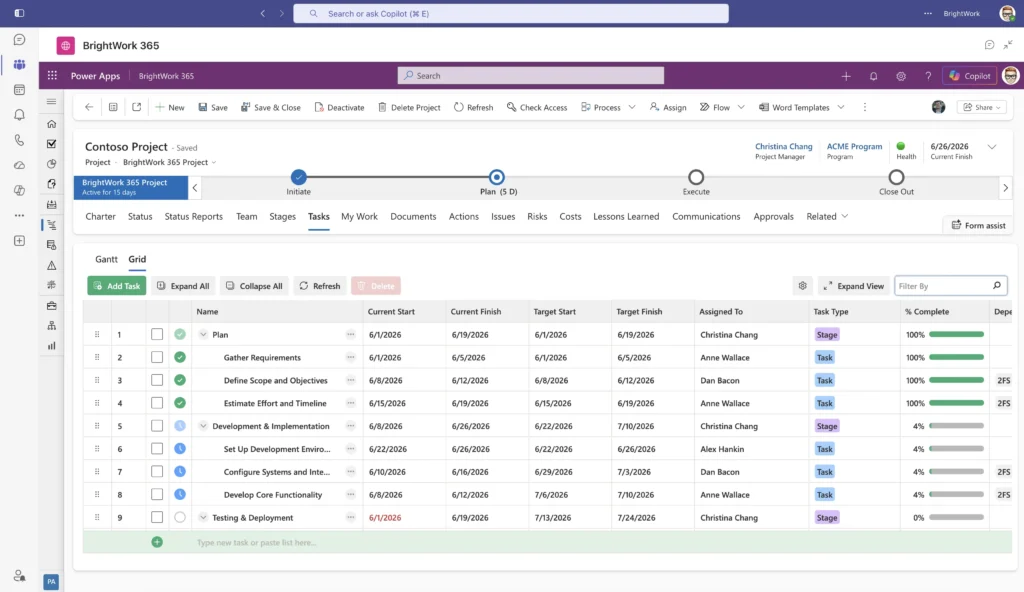
One of the most common findings in government project management reviews is a lack of consistency. Different teams managing projects in different ways, using different templates, and applying different governance standards. BrightWork 365 addresses this through a library of ready-to-use project templates that embed best practice directly into the platform.
Government project teams can start a new project from pre-configured templates that include standard task lists, risk and issue registers, governance checklists, stakeholder maps, and document libraries, all aligned to your organization’s project and program management standards. New projects can be set up in minutes rather than days.
Portfolio Visibility for Senior Leaders
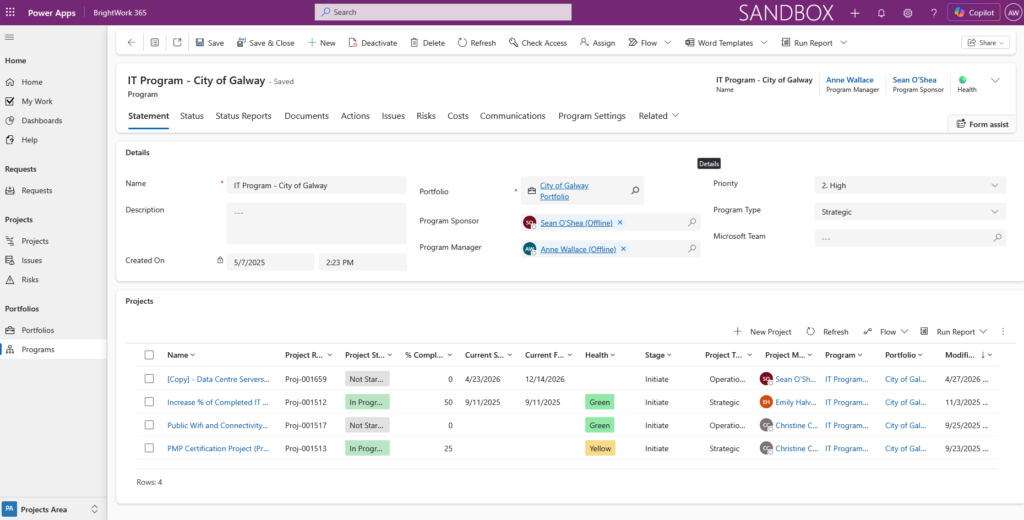
BrightWork 365 provides senior responsible owners, program directors, and PMO leaders with an immediate view across all live projects and programs. The portfolio dashboard shows RAG status, milestone performance, resource utilization, and risk exposure in real time without requiring project managers to manually submit weekly status reports.
For government organizations with Program Management Offices, BrightWork 365 provides the data infrastructure to move from a reporting function to a genuine center of excellence, analyzing trends, identifying systemic risks, and providing strategic advice to senior leadership.
Governance and Audit Trail Built In
BrightWork 365 maintains a complete, auditable record of project activity: decisions, changes, approvals, risk assessments, and issue resolutions – within the secure Microsoft 365 environment. This is not an afterthought; it is central to the design of the platform. Government project managers can demonstrate at any point that governance has been followed, approvals have been obtained, and decisions have been documented.
Flexible to Your Processes, Without Enterprise-Level Costs
Government organizations rarely manage projects in exactly the same way. BrightWork 365 can be tailored to accommodate agency-specific governance, reporting, approvals, and project delivery processes while remaining within the Microsoft 365 environment. This flexibility and integrations allow departments to adapt the solution to changing requirements without the cost and complexity often associated with heavily customized enterprise platforms.
Continuous Improvement Through Lessons Learned
One of the perennial weaknesses of government project management is the failure to systematically capture and apply lessons learned. Projects end, teams disperse, and the same mistakes recur in the next program. BrightWork 365 supports structured lessons-learned processes that feed directly into improved templates and processes so that organizational knowledge is retained and continuously applied.
Scalable Across Your Organization
BrightWork 365 is designed to scale from a single project team to a complex portfolio of programs spanning an entire government department. The platform can accommodate the needs of a small project team in a local authority or State agencies and the portfolio management requirements of a large government department running dozens of concurrent projects. As your organization’s project management maturity grows, BrightWork 365 grows with it.
Microsoft 365 Security and Compliance
BrightWork 365 operates entirely within your existing Microsoft 365 tenant (Microsoft Government Community Cloud or GCC for US), meaning that all project data remains under your organization’s control, subject to your existing security policies, access controls, and data governance frameworks.
For government organizations with specific requirements around data residency, security classification, or cloud hosting, this is a significant advantage over standalone project management tools that sit outside the Microsoft ecosystem.
Government Use Cases
The following use cases illustrate how government project teams are applying BrightWork 365 and Microsoft 365 to solve real project management challenges.
Use Case 1: Digital Transformation Program
A national agency undergoing a major IT modernization program needed to manage multiple concurrent technology projects, coordinate with external system integrators, and maintain clear separation of duties for security and audit purposes.
BrightWork 365 provided a standardized project management framework across all workstreams, with Microsoft Teams integration enabling secure collaboration with external contractors. The PMO gained portfolio-level visibility for the first time, enabling early identification of resource conflicts and cross-project dependencies.
Use Case 2: Regulatory Compliance Initiative
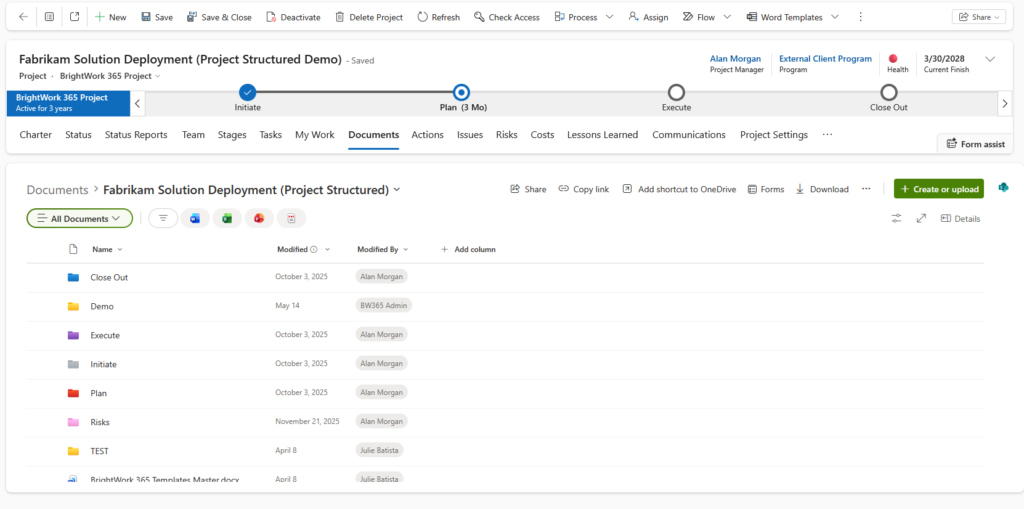
A government regulatory body needed to manage a complex compliance implementation project with hard statutory deadlines, multiple internal workstreams, and significant external stakeholder engagement. The absence of a shared project management platform had led to inconsistent reporting and missed dependencies.
Deploying BrightWork 365 on the existing Microsoft 365 platform, the project team established a shared project hub with standardized task management, a live risk register, and a stakeholder engagement tracker. The project was delivered on time, with a complete audit trail available for post-project review.
Use Case 3: PMO Establishment in a Local Authority
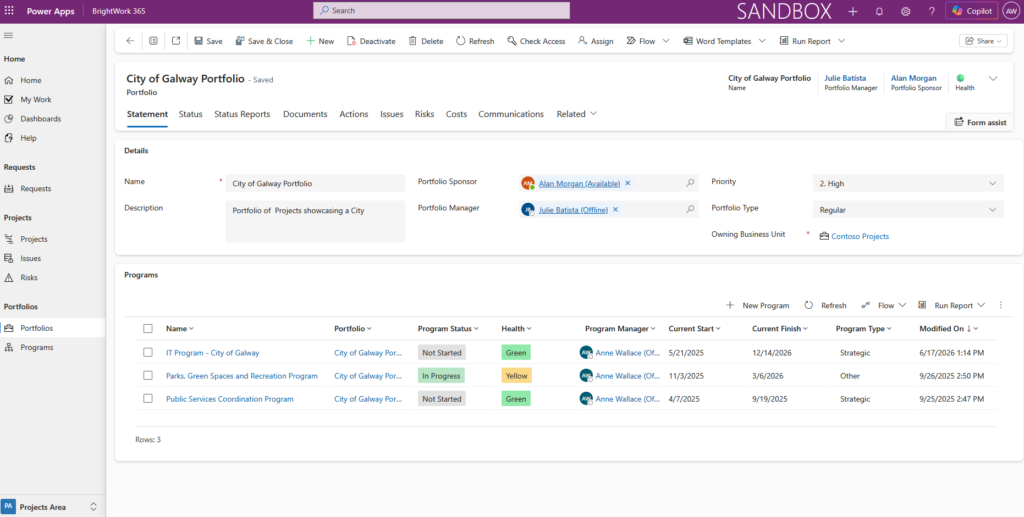
A local authority establishing a new PMO needed a platform that could support project managers of varying levels of experience and that could be implemented quickly without significant IT resources.
BrightWork 365’s ready-to-use templates and intuitive Microsoft 365 interface allowed the PMO to onboard project teams rapidly, with minimal training required. Within weeks, the authority had a consolidated portfolio view of all live capital and operational projects for the first time.
Use Case 4: Capital Infrastructure Program Management
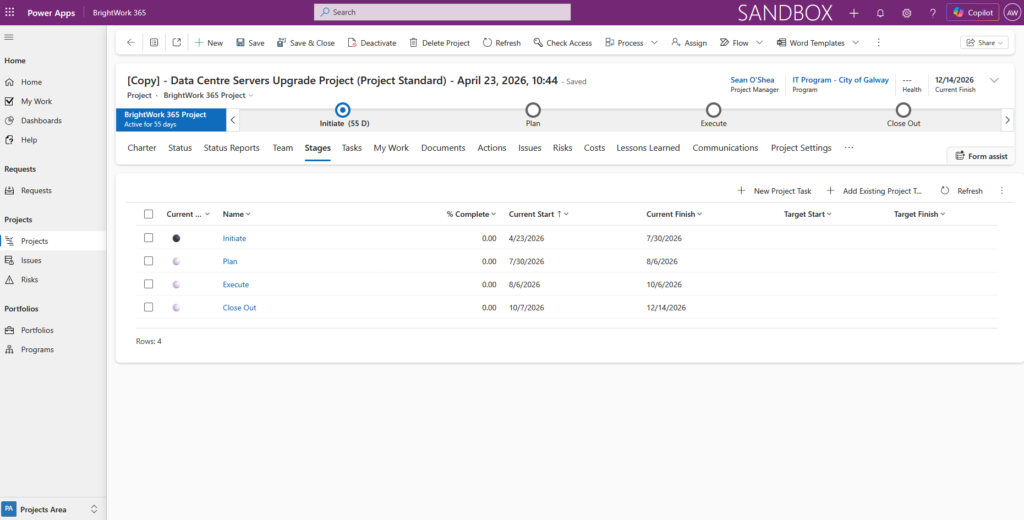
A government department managing a multi-year capital infrastructure investment program needed a single platform to track project status, monitor spend against budget, manage contractor relationships, and report to leadership oversight boards on a monthly basis.
Using BrightWork 365, the program team established a portfolio view across all capital projects, with individual project sites for each scheme. Power BI dashboards provided the program board with real-time visibility of spend, milestones, and risk. Monthly status reports that previously took three days to compile were generated automatically in minutes.
Getting Started – The Practical Path Forward
Government organizations often face specific barriers when adopting new project management tooling: procurement timelines, IT governance requirements, change management challenges, and limited implementation resources. BrightWork 365 is designed to address these barriers.
Start With What You Have
Because BrightWork 365 is built on Microsoft 365, your organization almost certainly already has the underlying platform. There is no need to procure, install, or secure a separate application. Implementation can begin within your existing Microsoft 365 tenant, under your existing security and governance framework.
Implement Incrementally
BrightWork 365 does not require a big-bang implementation. Government organizations can begin with a pilot project or a single team, establish proven templates and processes, and then expand adoption across the department at a pace that suits their capacity and change management requirements.
BrightWork Services: Support for Every Stage
BrightWork offers a range of professional services specifically designed to support government project management teams at every stage of their journey:
-
Start: Initial configuration, template setup, and onboarding for your first projects.
-
Evolve: Expanding the platform to additional teams, programs, and use cases as your PMO matures.
-
Augment: Specialist support for complex configuration, Power BI reporting development, and advanced governance workflows.
-
Project Management Success Review: An independent assessment of your project management practices with recommendations for improvement.
-
Support: Ongoing Support: Dedicated support to ensure your team continues to get maximum value from the platform.
Measuring Success
As you implement BrightWork 365, it is worth defining upfront what success looks like for your organization. Common measures for government project management teams include:
-
Reduction in time spent on manual status reporting
-
Improvement in on-time delivery of project milestones
-
Increase in audit readiness and governance compliance
-
Improvement in cross-departmental collaboration and information sharing
-
Senior leader satisfaction with portfolio visibility and reporting quality
-
Evidence of lessons learned being applied to future projects
Conclusion
Project Management as a Public Service
The stakes in government project management have never been higher. The public expects digital services that work, infrastructure that is delivered on time and within budget, and policy programs that achieve their intended outcomes. Project managers, project leads, and senior leaders in government are the people responsible for making that happen.
The good news is that you do not need a new technology ecosystem to rise to this challenge. Microsoft 365 is already deployed across your organization. BrightWork 365 brings together the best of Microsoft 365: SharePoint, Teams, Power BI, Power Automate, Planner into a purpose-built project and portfolio management solution that is ready to use from day one.
Whether you are managing a single capital project, running a complex multi-department program, or establishing a PMO that will govern a portfolio of strategic initiatives, BrightWork 365 provides the governance, visibility, and collaboration capability that public sector project management demands.
Ready to Take the Next Step?
BrightWork 365 offers a free trial and dedicated demonstration sessions for government and public sector organizations.
Our team understands the specific governance, security, and procurement requirements of the public sector and can guide you through the process of evaluating and implementing BrightWork 365 within your Microsoft 365 environment.