
Connecting Engineering, Production, and Quality with Microsoft Teams
Manufacturing project collaboration in Microsoft Teams works best when each initiative has a clear workspace, shared project record, and repeatable status routine.
Teams gives engineering, production, quality, procurement, and project managers one place to coordinate day-to-day work, while BrightWork 365 adds the structured project data and portfolio reporting the PMO needs across multiple initiatives.
In this article:
-
Create a defined Teams workspace for each manufacturing project, with channels aligned to real cross-functional handoffs.
-
Keep conversations, files, actions, and decisions close to the work while ERP, MES, PLM, and QMS platforms remain authoritative for specialist records.
-
Track milestones, risks, approvals, decisions, and status in a structured project record so the PMO can compare initiatives consistently.
-
Use a repeatable status routine with BrightWork 365 templates, workflows, and reporting to surface delays, supplier dependencies, readiness gaps, and items needing escalation.
Follow One Initiative Across the Plant
Consider a production-line upgrade. Engineering defines the change. Procurement coordinates suppliers. Production plans installation windows. Quality reviews acceptance evidence. The project manager tracks dependencies and prepares updates for sponsors.
Without a shared workspace, each function may hold a different part of the project record:
-
Engineering stores specifications in a departmental library.
-
Procurement follows supplier actions in email.
-
Production tracks downtime dates in a spreadsheet.
-
Quality keeps review notes in a separate folder.
-
The project manager copies updates into a slide deck.
The problem goes beyond communication volume. The initiative lacks a common project context. People can stay busy and responsive while decisions, dependencies, and changes remain scattered across several locations.
A shared project workspace gives the team a visible place to coordinate those handoffs without forcing every specialist activity into the same system.
Give Each Project a Defined Teams Workspace
BrightWork 365 supports project collaboration in Microsoft Teams, helping teams keep chats, files, tasks, and meetings connected to project work. A practical Microsoft Teams workspace for manufacturing projects starts with a simple structure that people can recognize.
A production-line upgrade might include:
-
General for the current summary and sponsor notices.
-
Engineering for specifications, technical actions, and design decisions.
-
Production readiness for shutdown plans, training, and operating checks.
-
Quality for review actions and acceptance evidence.
-
Procurement for supplier dates and commercial dependencies.
Avoid creating a channel for every discussion. Too many channels make project information harder to scan. Add one when it has a defined owner, audience, and information type.
Each workspace also needs a naming convention. Include the project identifier and a short name matching the portfolio record. Consistent naming helps people find the correct Team and reduces duplicate workspaces.
Keep Conversations Close to the Work
Teams becomes more useful when a conversation and its supporting evidence stay connected.
A question about an installation date can sit in the production-readiness channel. A specification review can link directly to the controlled file. A supplier delay can point to the milestone affected by the change.
Set a few communication rules for every project:
-
Put project decisions in the relevant channel instead of a private chat.
-
Link to the source document instead of sending new copies.
-
Assign an owner and due date when a discussion creates an action.
-
Record approved decisions in the structured project record.
-
Use meetings for discussion, then publish the outcome where the team can find it.
These habits keep collaboration accessible without trying to convert every Teams message into formal project data.
Keep Project Documents Connected to the Right Systems
Microsoft Teams and SharePoint Online work together for document collaboration. Project files can remain close to the workspace while following the library structure, permissions, and version controls selected by the organization.
Set Document Rules Before Work Starts
Define a few document rules before the project starts:
-
Identify which document types belong in the project workspace.
-
Specify the library or folder for each document type.
-
Set edit, review, and approval permissions.
-
Establish how users identify the approved version.
-
Define which records belong in another controlled business system.
Maintain Clear System Boundaries
A project workspace should support specialist systems rather than replace them.
ERP, MES, PLM, and QMS platforms may remain authoritative for operational, production, product, financial, or quality records. BrightWork 365 coordinates project information around those activities and connects teams through Microsoft 365.
BrightWork also supports documented integration scenarios beyond collaboration tools. For example, its manufacturing integration model includes ERP-linked cost tracking with Dynamics 365 Finance, bringing project cost and budget updates into project dashboards.
The boundary should stay clear. Project management data belongs in the project environment. Specialist operational records remain in the system selected to govern them.
Connect the Four Main Manufacturing Handoffs
Cross-functional manufacturing projects often slow down at the point where one team’s work becomes another team’s input. Clear handoffs make dependencies visible before they turn into schedule problems.
Engineering to Procurement
Procurement needs approved requirements, target dates, and a clear contact before purchasing activity can move forward.
Keep supplier questions, actions, and links to approved specifications together in the workspace. The project plan should also show when a delayed engineering decision moves a purchasing milestone.
Procurement to Production
Production needs current delivery expectations plus any site, access, installation, or shutdown requirements connected to the supplier.
A supplier update should move into project status when it changes the schedule, cost position, installation plan, or production-readiness date.
Production to Quality
Quality needs visibility into the checks, documents, and acceptance decisions required before handover.
Teams can coordinate review activity and keep project discussions accessible. The authoritative quality record should remain in the organization’s designated quality system when one is required.
Quality to the Project Sponsor
Sponsors rarely need every technical discussion. They need a concise view of readiness, open decisions, major risks, and the next approval point.
The project manager converts functional detail into a common status so sponsors can see where intervention or approval is needed.
Visible handoffs allow each function to keep its specialist processes while the project maintains shared dates, owners, dependencies, and decisions.
Add a Structured Project Record
Teams organizes day-to-day collaboration, but chat threads and channel files are difficult to compare across dozens of manufacturing initiatives.
A structured project record gives project managers and the PMO a consistent management layer.
Capture Consistent Management Data
Useful fields may include:
-
Project owner and sponsor.
-
Current stage and status.
-
Major milestones and target dates.
-
Priority risks and issues.
-
Decisions requiring escalation.
-
Budget status at the level authorized for PMO reporting.
-
Links to the Team and authoritative documents.
-
Date and owner of the latest status update.
BrightWork 365 for manufacturing project management combines Microsoft 365 collaboration with configurable project templates, workflows, dashboards, and portfolio reporting.
Teams can hold the working conversation. The structured project record provides comparable management data across initiatives.
Apply the Model Across Manufacturing Projects
Manufacturers are already applying this model in practice. Silver Bay Seafoods used BrightWork 365 to centralize project information, strengthen cross-location collaboration, standardize reporting, and improve leadership visibility across a multi-site capital project environment.
Build a Status Routine the Plant Can Sustain
Governance creates little value when the reporting process feels detached from daily project work. A practical status routine should reuse information that teams already produce during execution.
Establish a Weekly Reporting Sequence
A weekly sequence could work like this:
-
Functional owners update actions and milestone forecasts.
-
The project manager reviews new risks, issues, dependencies, and decisions.
-
The team discusses exceptions in the relevant channel or meeting.
-
The project manager updates the common project status.
-
The PMO reviews items crossing an agreed escalation threshold.
Define What Requires Escalation
An escalation threshold might include a late major milestone, unresolved approval, supplier delay, cost concern, or readiness gap. Each organization should define its own rules based on governance needs.
Software alone cannot create a reliable status process. Project teams need agreed definitions, ownership, and a consistent update routine.
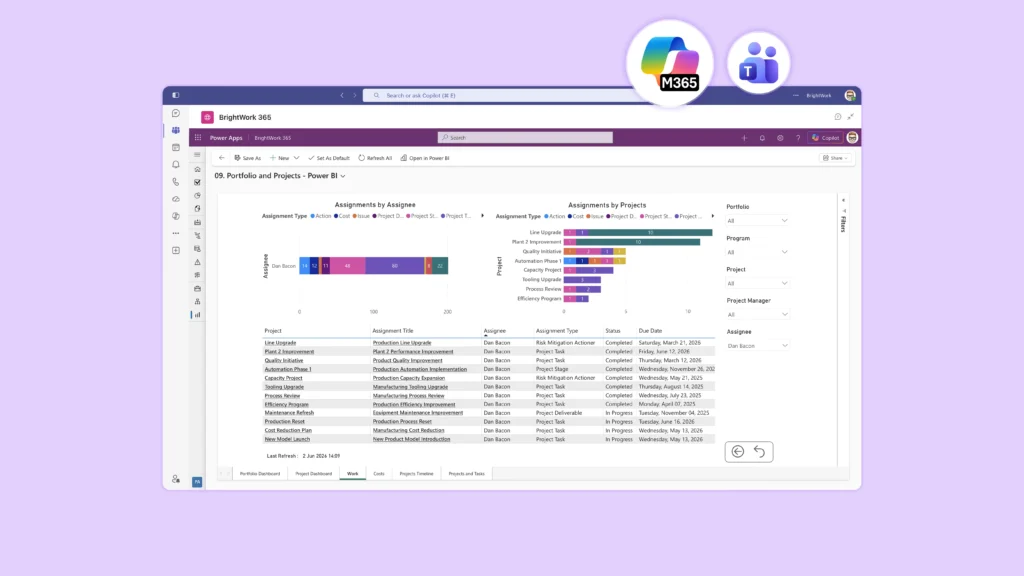
BrightWork 365 also allows status updates and Power BI dashboard URLs to be shared in Teams. Keep the action clear when designing the process. Sharing a dashboard link gives users direct access to reporting. It should not be presented as an automatic embedded reporting process unless the organization’s configured solution supports one.
Give the PMO Portfolio Visibility Without Reading Every Channel
The PMO should not need to follow every project discussion. Portfolio oversight works better when common project records provide the information needed for management review.
Focus Portfolio Reporting on Exceptions
Useful portfolio questions include:
-
Which initiatives have a late production-readiness milestone?
-
Which projects are waiting for an engineering or quality decision?
-
Where has a supplier dependency changed a target date?
-
Which projects have missed their latest status update?
-
Which issues need sponsor or steering-group action?
Reliable answers depend on common fields and reporting rules.
Standardize Status Definitions
If every project manager applies a different meaning to red, amber, and green, a portfolio dashboard will carry those inconsistencies into leadership reporting.
Agree on status definitions before reports are built. Give project managers concrete examples of each rating. Review early reporting cycles and correct interpretation gaps before the process becomes established.
Give the PMO Portfolio Visibility Without Reading Every Channel
Start with one repeatable manufacturing project type, such as equipment installation, a line upgrade, or new product introduction. Test the collaboration and reporting model on real work before applying it across the portfolio.
Step 1: Map the Handoffs
List the functions, decisions, documents, milestones, approvals, and exceptions moving across team boundaries.
Focus on the points where work changes hands. Those transitions should shape the workspace.
Step 2: Design the Workspace
Create only the channels and document locations needed for those handoffs. Assign an owner for each area.
Keep the first version simple. Additional structure should solve a demonstrated project need.
Step 3: Define the Project Record
Choose the fields needed for project status and portfolio review. Link the record to the corresponding Team and authoritative documents.
Consistency matters more here than having a large number of fields
Step 4: Pilot the Full Reporting Cycle
Run the project through day-to-day collaboration, a status update, an escalation, and a leadership review.
Look for gaps between what teams discuss and what management needs to see.
Step 5: Turn the Design Into a Template
Capture the naming convention, channel structure, project fields, reporting rules, and setup responsibilities.
BrightWork 365 provides configurable manufacturing project templates for different levels of project structure, including approaches suited to product updates, new product introduction, engineering work, and operational initiatives.
Adjust the template after real use before expanding it across additional project types or plants.
Connect Manufacturing Collaboration to Portfolio Oversight
Microsoft Teams can give a manufacturing initiative one visible place for day-to-day collaboration. A structured project management layer converts those individual workspaces into a portfolio the PMO can compare and manage.
The strongest model keeps each tool focused on the work it handles best. Teams supports conversations, meetings, and collaboration. SharePoint Online supports project documents. BrightWork 365 adds project structure, templates, status, workflows, and portfolio visibility across the manufacturing environment.
Start with one recurring initiative and prove the model through a complete reporting cycle. Then standardize what works.
See BrightWork 365 in Action
See how BrightWork 365 can support your manufacturing project processes with configurable templates, Microsoft 365 collaboration, workflows, and portfolio reporting. Request a BrightWork 365 demo using one of your recurring project types as the starting point.
Common Questions About Manufacturing Collaboration in Teams
Can Teams Manage a Manufacturing Project?
Microsoft Teams supports project communication, meetings, files, and day-to-day coordination.
Organizations needing consistent project intake, milestones, risks, status, governance, and portfolio reporting can add a structured project and portfolio management layer with BrightWork 365.
Should Every Manufacturing Function Use the Same Channel Structure?
No. Start with a common minimum structure and add channels only where teams have a defined collaboration need.
Portfolio fields and reporting definitions usually need more consistency than the channel structure because management reporting depends on comparable project data.
Does This Setup Replace ERP, MES, PLM, or QMS Software?
No. Specialist systems should continue to hold the operational, production, product, financial, or quality records assigned to them.
BrightWork 365 coordinates project management around those activities. Supported Microsoft integrations can also connect selected information across systems, including the documented Dynamics 365 Finance cost-tracking scenario.
How Should Leaders Receive Project Updates?
Give leaders a common project status and portfolio report instead of expecting them to follow individual Teams channels.
A Power BI report link can also be shared in Teams when it helps stakeholders access the latest reporting. Keep the underlying status process consistent so leaders can trust what they see.