
Introduction
Every project carries risk.
Deadlines slip. Requirements change. Key resources become unavailable. Vendors miss commitments. Stakeholders change priorities. Budgets tighten.
The challenge for most project teams is not that risks exist – it is that risks are often identified too late.
According to the Project Management Institute (PMI), project risk management includes identifying, analyzing, planning responses to, implementing responses for, and continuously monitoring risks throughout the project lifecycle. Effective risk management is not a one-time exercise completed during project planning; it is an ongoing process that helps increase the likelihood of achieving project objectives.
Traditional risk management relies heavily on experience, manual reviews, status meetings, spreadsheets, and project managers noticing warning signs before they become major issues. As projects become more complex and organizations manage larger portfolios, this approach becomes increasingly difficult to sustain.
This is where Artificial Intelligence (AI) is beginning to transform project management. AI helps teams identify risks earlier, surface hidden patterns, automate analysis, and provide recommendations that support better decision-making. AI can reduce administrative effort while enabling project managers, PMOs, and executives to focus on what matters most: managing project outcomes.
For organizations already working within Microsoft 365, tools like Microsoft Copilot, Power BI, Power Automate create new opportunities to strengthen risk management without introducing entirely new systems.
AI Webinar: Stop Automating Project Management Chaos
Why AI rewards organisations that already have their house in order
Why Risk Identification Is So Difficult
One of the biggest challenges in project management is that risks rarely appear suddenly.
Most risks develop gradually through small warning signals:
-
Missed tasks
-
Delayed approvals
-
Increasing workloads
-
Scope changes
-
Rising issue counts
-
Communication gaps
-
Budget variances
-
Dependency conflicts
The problem is that these indicators often exist across multiple tools and conversations.
A project update may mention resource concerns. A Teams meeting may reveal stakeholder uncertainty. An email thread may highlight vendor delays. A dashboard may show decreasing schedule performance.
Individually, none of these signals may seem critical.
Collectively, they can indicate a project heading toward trouble.
AI excels at analyzing large amounts of information across multiple sources and helping teams recognize patterns that humans may overlook.
How AI Supports Risk Identification
AI helps project teams move from reactive risk management to proactive risk management. Rather than waiting for risks to become issues, AI can help surface potential threats earlier.
Some common AI-powered risk identification capabilities include:
1. Analyzing Project Information at Scale
Generative AI tools can review:
-
Project plans
-
Status reports
-
Meeting notes
-
Action items
-
Requirements documents
-
Risk registers
-
Lessons learned repositories
-
Stakeholder communications
Using natural language processing, AI can identify recurring themes, potential concerns, and project areas that may require closer attention.
For example, if multiple status reports mention testing delays, unresolved dependencies, and resource constraints, AI may highlight a potential schedule risk before the team formally logs it.
2. Identifying Hidden Patterns
Advanced AI models can analyze historical project performance and identify patterns associated with project failure or success.
Examples include:
-
Projects with repeated scope changes
-
Projects that exceed resource capacity thresholds
-
Projects with persistent issue escalation
-
Projects with declining milestone completion rates
These patterns can help project managers focus their attention on projects that may require intervention.
3. Risk Brainstorming Support
One of the simplest but most effective AI use cases is risk brainstorming.
Project managers can ask AI tools such as Microsoft Copilot, ChatGPT, Claude, or Gemini to:
“Identify potential risks for a software implementation project in a government organization.”
Or:
“Generate a risk register for a manufacturing ERP deployment.”
The result is not a final risk assessment but a strong starting point that helps teams identify risks they may not have considered.
This approach is particularly valuable for less experienced project managers or teams working on unfamiliar initiatives.
Using Microsoft Copilot for Risk Management
Organizations already using Microsoft 365 have a significant advantage.
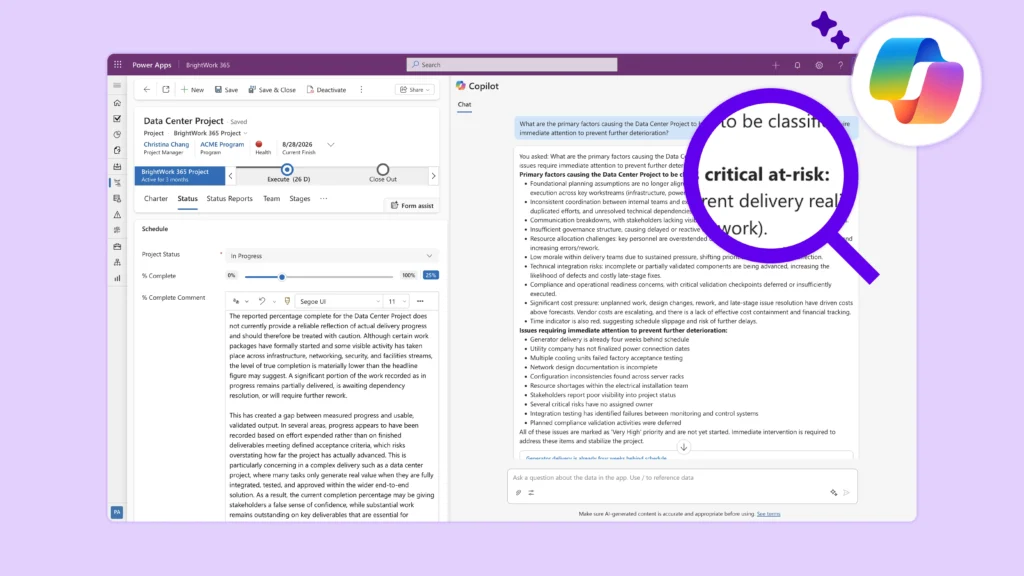
Microsoft Copilot can work across familiar tools such as:
-
Teams
-
Outlook
-
Word
-
Excel
-
OneNote
-
SharePoint
-
Power Platform
This means project teams can leverage AI without changing how they work.
For Individual Team Members
Team members can use Copilot to:
-
Summarize project discussions
-
Capture meeting actions
-
Flag outstanding tasks
-
Identify blockers
-
Draft project updates
This improves visibility and reduces the likelihood that emerging risks are missed.
For Project Managers
Project managers can use Copilot to:
-
Draft risk registers
-
Review project documentation
-
Generate status reports
-
Summarize stakeholder feedback
-
Identify recurring project concerns
-
Create mitigation action plans
Instead of spending hours reviewing conversations and documents, project managers can quickly surface relevant insights for further evaluation.
For PMOs
PMOs often struggle with visibility across multiple projects.
Copilot can help PMOs:
-
Analyze portfolio updates
-
Summarize project health information
-
Highlight projects requiring attention
-
Surface governance concerns
-
Support portfolio reporting
This enables PMOs to focus more on strategic oversight rather than administrative consolidation.
AI-Powered Risk Mitigation
Identifying risks is only the first step.
Effective project management requires mitigation planning and proactive response.
AI can help here as well.
Generating Mitigation Strategies
Once a risk is identified, AI can suggest potential responses.
For example:
Risk: Key subject matter experts are unavailable during testing.
AI might suggest:
-
Cross-training additional resources
-
Creating backup testing plans
-
Adjusting milestone timing
-
Prioritizing critical test scenarios
-
Securing early stakeholder commitment
These suggestions should always be reviewed by project leaders, but they can accelerate planning considerably.
Scenario Analysis
AI can help teams explore possible outcomes before making decisions.
Examples include:
Risk: Key subject matter experts are unavailable during testing.
AI might suggest:
-
What happens if a major milestone slips by two weeks?
-
What is the impact of losing a key resource?
-
How would a 15% budget reduction affect delivery?
-
Which dependencies create the greatest risk exposure?
Scenario planning improves preparedness and supports more informed decision-making.
Continuous Monitoring
Traditional risk reviews often occur weekly or monthly.
AI can support more continuous analysis by monitoring project data, updates, and performance indicators.
This creates opportunities to identify new risks sooner and respond faster.
AI can help here as well.
Combining AI with Power BI for Risk Reporting
Risk management becomes significantly more effective when combined with strong reporting and analytics.
Power BI enables organizations to visualize project risk data across projects, programs, and portfolios.
When combined with AI capabilities, Power BI can help answer questions such as:
-
Which projects are most at risk?
-
Which risks occur most frequently?
-
Which departments experience the most delays?
-
Where are resource constraints emerging?
-
Which mitigation strategies are most effective?
Executives no longer need to review multiple spreadsheets or reports.
Instead, they can access real-time visibility into project risk across the organization.
For PMOs, this is particularly powerful because it helps shift conversations from reporting problems to solving them.
Best Practices for Using AI in Risk Management
Despite its potential, AI should not become the sole source of risk management decisions.
The most successful organizations view AI as a project management assistant rather than a project manager.
Validate AI Recommendations
AI can occasionally generate inaccurate or incomplete suggestions.
Project managers should always review:
Risk: Key subject matter experts are unavailable during testing.
AI might suggest:
-
Risk assessments
-
Mitigation recommendations
-
Impact analysis
-
Stakeholder communications
Human judgment remains essential.
Maintain Structured Processes
AI performs best when organizations already have:
-
Defined project methodologies
-
Standard risk registers
-
Consistent reporting practices
-
Governance frameworks
AI amplifies maturity – it does not replace it.
Use AI to Enhance, Not Automate, Decision-Making
The goal is not to remove project managers from the process.
The goal is to help project managers spend less time gathering information and more time making decisions.
Ensure Governance and Security
Organizations should establish clear guidance regarding:
-
Approved AI tools
-
Data usage policies
-
Security requirements
-
Privacy considerations
-
Human review responsibilities
Responsible AI adoption is critical, particularly in regulated industries.
The Future of Project Risk Management
Project risk management is shifting from periodic reviews and reactive interventions to continuous, AI-assisted monitoring.
Tools such as Microsoft Copilot, Power BI, Power Automate, ChatGPT, Claude, and Gemini are helping project teams identify risks earlier, streamline reporting, and make more informed decisions.
The organizations that will benefit most from AI are not necessarily those with the most advanced technology, but those that combine strong project management practices with intelligent use of AI tools.
AI is not a replacement for project management expertise. Instead, it gives project managers, PMOs, and business leaders better insights, faster access to information, and more time to focus on delivering successful outcomes.
As AI continues to evolve, the most effective project teams will be those that combine human judgment, proven project management practices, and AI-powered intelligence to identify risks sooner and respond with confidence.