
Introduction
Project managers are often asked to answer some of these difficult questions:
-
Will this project finish on time?
-
Do we have enough people to deliver this work?
-
Which projects are putting the most pressure on our teams?
-
What happens if priorities change?
-
Which project should we green light first given the resources?
Historically, answering these questions required a mix of spreadsheets, experience, stakeholder discussions, and educated guesswork. While experienced project managers often develop strong instincts, forecasting timelines and workloads becomes increasingly difficult as projects, teams, and portfolios grow in complexity.
Today, Artificial Intelligence (AI) is changing the way organizations approach forecasting.
Rather than manually analyzing schedules, task lists, resource assignments, and status reports, project managers can use AI to identify trends, predict delays, highlight resource constraints, and make better planning decisions earlier in the project lifecycle.
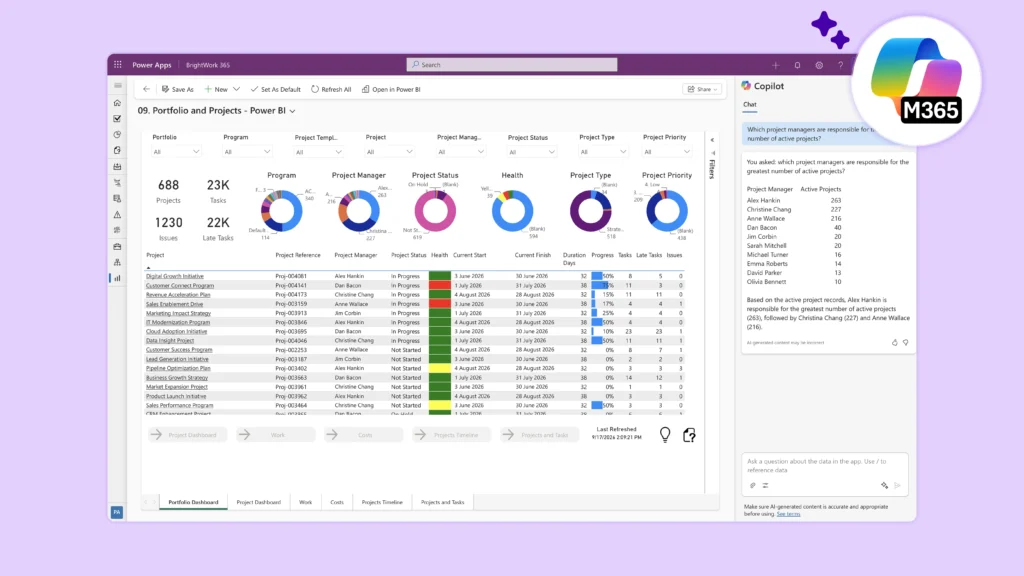
For organizations already working in Microsoft 365, tools such as Microsoft Copilot, Power BI, Power Automate, and BrightWork 365 provide new opportunities to improve forecasting while reducing administrative effort.
AI Webinar: Stop Automating Project Management Chaos
Why AI rewards organizations that already have their house in order
Challenges of Forecasting
Project plans are often created using the best information available at the time.
The reality is that projects rarely unfold exactly as planned.
Unexpected scope changes, resource conflicts, stakeholder delays, shifting priorities, and emerging risks can quickly make a carefully crafted schedule inaccurate.
Resource planning presents a similar challenge.
A team member who appears to have 20 available hours next month may suddenly become involved in urgent work, project support activities, or competing priorities. What looked achievable in planning can quickly become unrealistic in execution.
According to Project Management Institute (PMI), project professionals increasingly need new AI-related capabilities as AI becomes embedded in project delivery and decision-making. PMI also notes that AI is expected to support a significant portion of project management activities in the coming years, helping teams make more informed decisions and improve project outcomes. Artificial Intelligence in Project Management
This is where AI-powered forecasting can help.
How AI Supports Timeline Forecasting
Timeline forecasting focuses on predicting whether a project will achieve its planned milestones and delivery dates.
Identifying Schedule Risks Earlier
One of AI’s greatest strengths is pattern recognition.
AI can identify warning signs that may indicate future delays, including:
-
Tasks consistently taking longer than estimated.
-
Critical path activities slipping.
-
Repeated milestone delays.
-
Unresolved dependencies.
-
High volumes of open issues.
Many AI-enabled project management tools can analyze these patterns and alert project managers before schedule problems become significant.
Improving Project Planning
AI can also assist during project initiation.
Microsoft’s project-related Copilot capabilities can generate task plans, recommend work breakdown structures, and suggest task durations based on project descriptions and available context.
Instead of starting with a blank page, project managers can use AI-generated recommendations as a foundation and then refine them using their expertise and organizational knowledge.
Scenario Analysis
Project managers frequently need to evaluate multiple planning options.
For example:
-
What happens if a key milestone is delayed?
-
What is the impact of reducing project scope?
-
How will adding resources affect delivery dates?
-
Which dependencies represent the greatest schedule risk?
AI can help analyze different scenarios much faster than manual approaches, allowing project teams to make better-informed planning decisions.
How AI Supports Workload Forecasting
While timeline forecasting focuses on project delivery dates, workload forecasting focuses on people.
Resource constraints are consistently among the most common causes of project delays.
Workload forecasting helps answer questions like:
-
Who is overloaded with work?
-
Which teams are approaching capacity?
-
Do we need additional resources?
-
Are project priorities aligned with available skills?
PMI research has long identified resource forecasting and resource contention as significant challenges for organizations managing project portfolios.
AI can make these challenges much easier to manage.
Identifying Capacity Issues
AI tools can analyze workloads across:
-
Projects
-
Programs
-
Portfolios
-
Departments
-
Functional Teams
This helps leaders identify resource bottlenecks before they impact delivery.
For example, AI may detect that several upcoming projects require the same specialist skills during the same period and highlight a likely resource conflict.
Forecasting Future Resource Demand
Rather than focusing only on current workloads, AI can help organizations forecast future demand. Examples include:
-
Upcoming staffing requirements.
-
Seasonal workload patterns.
-
Expected project demand.
-
Future skill shortages.
-
Portfolio-level capacity planning.
This enables PMOs and leadership teams to plan ahead rather than reacting to problems after they occur.
Improving Resource Allocation Decisions
AI can support project managers when making resource allocation decisions by identifying:
-
Available capacity.
-
Underutilized resources.
-
Workload imbalances.
-
Potential skill gaps.
-
Competing project priorities.
While human judgment remains critical, AI helps decision-makers evaluate more information more quickly.
Using Microsoft Copilot for Forecasting
Organizations already working in Microsoft 365 have an advantage because forecasting insights can be generated from information that already exists across Teams, Outlook, SharePoint, Planner, and other Microsoft applications.
For Team Members
Team members can use Copilot to:
-
Summarize their assigned work.
-
Review upcoming deadlines.
-
Understand changing priorities.
-
Identify task dependencies.
-
Generate personal workload summaries.
This helps individuals stay aligned with project expectations and identify potential workload concerns early.
For Project Managers
Project managers can use Copilot to:
-
Review project schedules.
-
Summarize project progress.
-
Generate status reports.
-
Identify overdue activities.
-
Analyze dependencies.
-
Draft timeline adjustment recommendations.
Copilot can help project managers spend less time gathering information and more time making decisions.
For PMOs
PMOs often need portfolio-wide visibility into schedules and resource demand. Copilot can help PMOs:
-
Consolidate information across multiple projects.
-
Summarize portfolio performance.
-
Highlight projects at risk of delay.
-
Identify emerging capacity constraints.
-
Support executive reporting.
This aligns closely with many of the practical AI use cases project management teams are actively exploring today, including timeline forecasting, workload forecasting, resource planning, reporting, and portfolio visibility.
Combining AI and Power BI for Predictive Insights
While Copilot helps analyze information and answer questions, Power BI helps organizations visualize trends and track performance over time.
Together, they provide a powerful forecasting capability. Project leaders can use Power BI dashboards to monitor:
-
Milestone achievement trends.
-
Schedule performance.
-
Resource utilization.
-
Capacity forecasts.
-
Portfolio workloads.
-
Project completion rates.
AI-enabled analytics can help identify patterns that may not be obvious when reviewing individual project reports.
Instead of simply reporting project status, organizations can begin predicting future outcomes and taking corrective action earlier.
Why Data Quality Still Matters
One of the most important lessons organizations learn during AI adoption is that AI reflects the quality of the underlying data.
As project management expert, Elizabeth Harrin highlighted in her collaboration with BrightWork, AI does not fix broken processes. It amplifies them. Organizations lose time through fragmented information, duplicate reporting, poor visibility, and inconsistent workflows. AI performs best when supported by accessible, well-governed project data. Forecasting accuracy depends on:
-
Reliable project plans.
-
Consistent task tracking.
-
Up-to-date status reporting.
-
Standardized project processes.
-
Centralized project information.
Without these foundations, even the most advanced AI tools will struggle to deliver meaningful predictions.
The Role of BrightWork 365
Forecasting becomes significantly more valuable when project information is centralized. BrightWork 365 helps organizations manage:
-
Project schedules.
-
Tasks and deliverables.
-
Resource assignments.
-
Status reporting.
-
Risks and issues.
-
Portfolio oversight.
Because project information is captured in a structured way, organizations create a stronger foundation for AI-powered analysis, forecasting, and reporting.
You can learn more about BrightWork project management capabilities on the Project Portfolio Management Templates page and the BrightWork 365 platform.
Best Practices for AI-Powered Forecasting
Organizations seeing the greatest success with AI forecasting typically follow a few common principles.
Treat AI as a Planning Assistant
AI can identify patterns and generate recommendations, but project managers remain responsible for decisions.
Maintain Strong Project Management Practices
AI works best when supported by:
-
Clear governance.
-
Consistent planning.
-
Accurate reporting.
-
Defined workflows.
Validate Forecasts Regularly
Forecasts should inform decisions, not replace judgment. Organizations should continuously compare forecasts against actual outcomes and refine their processes over time.
The Future of Timeline and Workload Forecasting
Timeline and workload forecasting are moving beyond static schedules and manual resource planning toward continuous, AI-assisted decision-making.
Tools such as Microsoft Copilot, Power BI, BrightWork 365, ChatGPT, Claude, Gemini, and other AI platforms are helping organizations improve forecasting accuracy, increase visibility, and make better planning decisions.
The real opportunity is not fully automated project management.
The opportunity is empowering project managers, PMOs, and business leaders with better information, faster insights, and greater confidence in their planning decisions.
As AI continues to evolve, the most successful organizations will be those that combine human judgment, strong project management discipline, and AI-powered forecasting to deliver projects more predictably and make better use of their most valuable resource: their people.